


Sprouts
4.84.87K Reviews
App Specs
- Version
- 21.30.0
- Updated On
- License
- Free
- Downloads
- 1,000,000+
- Developer
- Sprouts App Developer
- Categories
- Shopping
- Platform
- Android, iOS
Screenshots
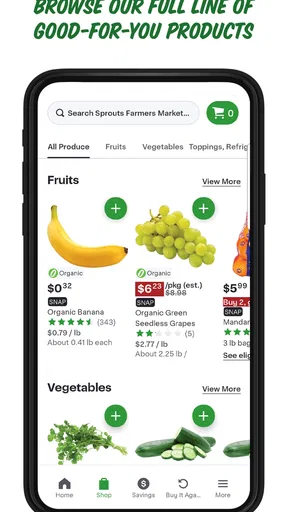
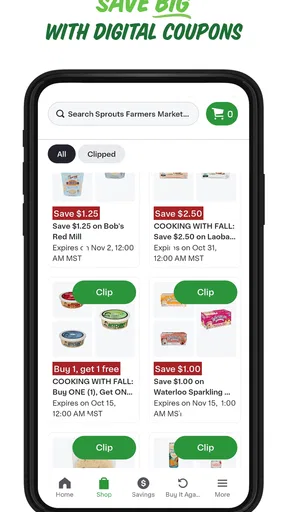
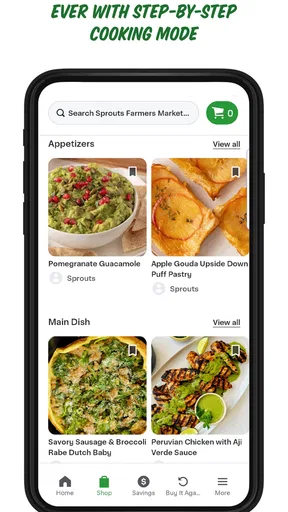
 Analysis by AppCompare
I approached Sprouts expecting a practical way to make healthier shopping feel less like a chore. That expectation matters, because Sprouts is a shopping app from Sprouts App Developer, not a plant-care or gardening tool. Its focus is the grocery trip: helping shoppers bring the store into their routine and make decisions before and while they shop. I find that kind of app most useful when it reduces small bits of friction without asking me to reorganize how I buy food.
Trust is part of that calculation. A shopping app can touch choices that feel personal, from what goes into a basket to how often someone visits a particular retailer. I judge it by what I can actually see and control, rather than assuming that a polished screen tells me everything about data handling. If you are cautious about accounts, permissions, and sharing, it is worth pausing during setup and reviewing each prompt instead of accepting every option automatically.
A store companion, not a general grocery marketplace
The main question I would ask before installing Sprouts is whether I already shop at Sprouts or expect to start. The app is most relevant when its store-specific shopping tools fit a real trip you make. It is less compelling if you need one place to compare prices across several grocery chains, manage orders from different retailers, or browse a broad marketplace. A retailer’s own app can be convenient, but its usefulness naturally depends on shopping at that retailer.
That distinction also shapes how I compare it with the usual alternatives. A paper list or a notes app is simpler and does not require a store account, but it will not provide the same retailer-focused experience. A general grocery-list app may be better for households that shop at several stores and want a neutral shared list. Sprouts makes more sense when keeping the trip connected to this particular store is the point, rather than when flexibility across retailers is the priority.
For someone deciding whether to try it, the basic commitment is modest: it is free, rated for Everyone, and has a 4.5 average from around 15,000 ratings. Those figures give a sense of broad uptake, not a promise that every feature will suit every shopper. I would treat the app as a practical option to test against my own habits, not as a reason to change stores or assume every shopping task is covered.
Using Sprouts with care and purpose
I use a little care when judging any store-linked app: convenience is valuable, but it should fit the way I shop rather than quietly take over the routine. In this section, I focus on making Sprouts useful for a real grocery trip while keeping my own list, budget, and choices in charge. That practical starting point also makes it easier to decide what information or access I am comfortable sharing.
Set it up around the way you actually shop
Rather than trying to use every option at once, I would start with one ordinary shopping trip. Open the app before leaving home, check what is useful for that visit, and decide whether it genuinely saves time compared with your usual notes or routine. This small trial makes it easier to tell whether Sprouts earns a place on your phone. It also avoids the common mistake of building a complicated digital workflow before knowing whether the retailer’s tools match your habits.
Worth Reading Before You Choose

EA SPORTS FC Mobile 26 Is a Bigger Football Game, but It Takes Time

Flipboard Shows What News Apps Must Do Beyond the Feed

Switching to Android Auto Means Rethinking Your Driving Routine

Google Calendar Makes a Crowded Week Easier to Manage

Ludo King Makes the Most of the Minutes Between Plans

Baby Panda World Brings Quick Play to Modern Phones, but Its Game Library Feels Busy
A realistic use case is a midweek trip after work. I might have a short list of ingredients, limited time, and no appetite for browsing aimlessly. The useful test is whether I can prepare for that visit in advance and keep the relevant details together while shopping. If I find myself switching repeatedly between the app, a separate notes list, and another grocery service, that is a sign that a simpler approach may work better for me.
There is a useful trade-off here: store-specific tools can make a visit feel more organized, but they can also encourage me to keep shopping within one retailer. I would use the app to support a plan, not to let whatever appears on screen replace the budget or list I made beforehand. For regular Sprouts shoppers, that distinction keeps convenience in its proper place; for people who compare several stores, a neutral list may remain the better starting point.
Make deliberate choices about accounts and access
When an app invites me to create an account or sign in, I consider whether that step is necessary for the particular task I want to do. I do not treat registration as automatically suspicious, but I also do not share personal details casually. Read the wording on each screen, look for choices that can be skipped, and review the account settings after setup. These are sensible habits with any shopping app, especially one tied to a retailer you may visit regularly.
Permissions deserve the same careful approach. I grant access only when a feature I intend to use calls for it, and I check the operating system’s permission controls if I later change my mind. A prompt is a request, not an obligation. If a shopping task works without granting optional access, I prefer to keep the choice narrow; if I cannot tell why a permission is needed, I pause and decide whether that feature is worth using.
There is a practical reason to be selective: convenience can blur into habit. Saving a store app to the home screen and opening it often may be useful, but it can also make it easier to browse or spend beyond the list. I try to set a budget before shopping and use the app as a tool for carrying out that plan. That approach gives me more control than relying on a retailer interface to decide what deserves my attention.
What to expect from a focused shopping app
Sprouts is not automatically the right answer for every grocery problem. If you mainly need meal planning across multiple stores, a shared household list, or broad price comparisons, a dedicated neutral tool may serve you better. If your shopping is occasional and you are comfortable with paper, installing another app might not improve anything. I would skip it if its store-specific focus does not match where I shop, or if I want to keep retailer accounts and apps to a minimum.
On the other hand, a frequent Sprouts shopper may appreciate having a store-oriented tool close at hand, particularly when planning repeat visits. The most useful approach is to test one or two tasks that matter to you rather than judging it by the number of features on a screen. Does it help you prepare, find what you need, or make the trip feel more manageable? If the answer is no after a few normal visits, there is little reason to keep it just because it is available.
Questions about setup are best handled in the moment: check whether the app offers a guest path or asks for an account, and choose based on the feature you need. For questions about personal information or account management, read the current in-app settings and the relevant policy before entering details. For questions about whether it will suit a household, try it alongside the existing list for one trip before asking everyone to switch. Those steps give a more reliable answer than assuming a feature will work a particular way.
The app has been available since December 28, 2012, and its current version is 21.18.0. It has passed one million installs and has around 4,800 written reviews. I see that history as useful context for a shopping app with an established audience, while remembering that popularity cannot tell me whether its current interface fits my routine. I would still make my own judgment from the tasks I actually need to do.
A cautious verdict for everyday shoppers
My recommendation is conditional rather than universal. If Sprouts is already one of your regular grocery stops, a free store app is a reasonable thing to try, provided you are comfortable reviewing its account and permission choices. If you shop across many chains or prefer to avoid retailer-specific accounts, a general list app or a simple notes page may be more useful. The best option is the one that reduces effort without nudging you away from your own budget and preferences.
I would start with a single planned visit, keep an eye on how many steps the app adds or removes, and avoid entering information that does not feel necessary. That gives you a fair sense of whether Sprouts belongs in your routine. A shopping app should support the way you buy groceries, not become another obligation to manage.
Getting Started with Sprouts
First things first, downloading and setting up Sprouts is a breeze. Available on both Android and iOS, it’s just a quick tap away on your device’s app store. Once you’ve got it, the app greets you with a vibrant, leafy interface that’s both inviting and straightforward. No need to be a tech whiz here; the user experience is as smooth as potting soil.
Upon launching, you’re prompted to create an account or log in, which is pretty standard. From there, the app offers a brief tutorial, guiding you through its main features. It’s like having a mini horticulture class in your pocket. Whether you’re a seasoned gardener or a newbie, the guidance is super helpful.
Exploring the Features
Now, let’s talk features, because this is where Sprouts really shines. The app provides a wide array of tools to help you cultivate your garden. You can track plant growth, get reminders for watering schedules, and even identify plants through a nifty photo recognition feature. It’s like having a pocket-sized botanist! 🌱
One feature I particularly loved is the community aspect. You can connect with fellow plant lovers, share tips, and even swap seeds. It’s like social media for gardeners, minus the drama. The community is thriving and supportive, making it a great place to learn and grow.
Why You’ll Love It
Okay, let’s get real for a moment. The reason Sprouts stands out is because it transforms gardening into an interactive, enjoyable experience. You’re not just maintaining plants; you’re nurturing them with personalized care plans tailored to each species’ needs. This app makes it easy to look after your leafy friends, even if you’ve got a busy schedule.
What’s more, the app features an impressive database of plants. Whether you’re into succulents, herbs, or exotic blooms, Sprouts has you covered. The detailed plant profiles are full of handy information, from ideal sunlight exposure to soil preferences.
Room for Growth
Like any app, there are areas where Sprouts could cultivate some improvements. While the plant identification feature is generally accurate, there were times it struggled with less common species. Also, a few more customization options for notifications would be a welcome addition. But hey, no app is perfect, right?
Despite these minor hiccups, the developers seem committed to rolling out updates and enhancing the user experience. I’m optimistic that they’ll continue to plant seeds for future growth.
Final Thoughts
In conclusion, if you’re looking to bring some greenery into your life without the hassle, Sprouts is definitely worth a download. It’s user-friendly, packed with features, and offers a thriving community for plant lovers. Whether you’re aiming to start a small herb garden or just want to keep your indoor plants alive, this app is your go-to garden guru.
So, give Sprouts a go, and let me know if your plants are as happy as mine. Happy gardening!
Pros
- User-friendly interface for easy navigation.
- Wide variety of educational games.
- Parental controls ensure safety.
- Colorful graphics engage children.
- Offline mode available for travel.
Cons
- Some games require in-app purchases.
- Limited customization options.
- Ads can be distracting for kids.
- Occasional app crashes reported.
- Content updates are infrequent.
FAQs for Sprouts
What is the primary objective of Sprouts?
Sprouts is a strategic puzzle game that challenges players to connect dots on a grid to form intricate patterns. The objective is to connect as many dots as possible without crossing existing connections, thereby encouraging strategic planning and creative thinking. It’s a game that combines relaxation with mental stimulation.
Is Sprouts suitable for all age groups?
Yes, Sprouts is designed for players of all ages, offering varying levels of difficulty. The intuitive gameplay and clear instructions make it accessible for younger players, while the strategic elements ensure that it remains engaging for adults. It's a perfect family-friendly game that can be enjoyed by everyone.
Does Sprouts require an internet connection?
No, Sprouts can be played offline, making it an excellent choice for travel or situations where internet access is limited. However, an internet connection is required to access certain features like leaderboards or updates. This flexibility allows you to enjoy the game anytime and anywhere.
Are there any in-app purchases in Sprouts?
Sprouts offers in-app purchases to enhance the gaming experience. While the basic version provides a full gaming experience, additional features like extra levels, hints, or ad removal can be purchased. These options allow players to customize their gameplay according to their preferences.
How does Sprouts handle user data and privacy?
Sprouts prioritizes user privacy by adhering to strict data protection policies. The app collects minimal data necessary for gameplay, such as progress and preferences, and uses encryption to safeguard this information. Users can review the privacy policy within the app to understand how their data is managed.


